All releases
New feature
Bing Webmaster Tools, with the real searches behind Bing's AI answers
Connect Bing Webmaster Tools to see the queries Bing's AI searched before it cited your site, the pages it cited, and your Bing search traffic, all in Website Analytics. ChatFeatured also writes tracked prompts from those queries.
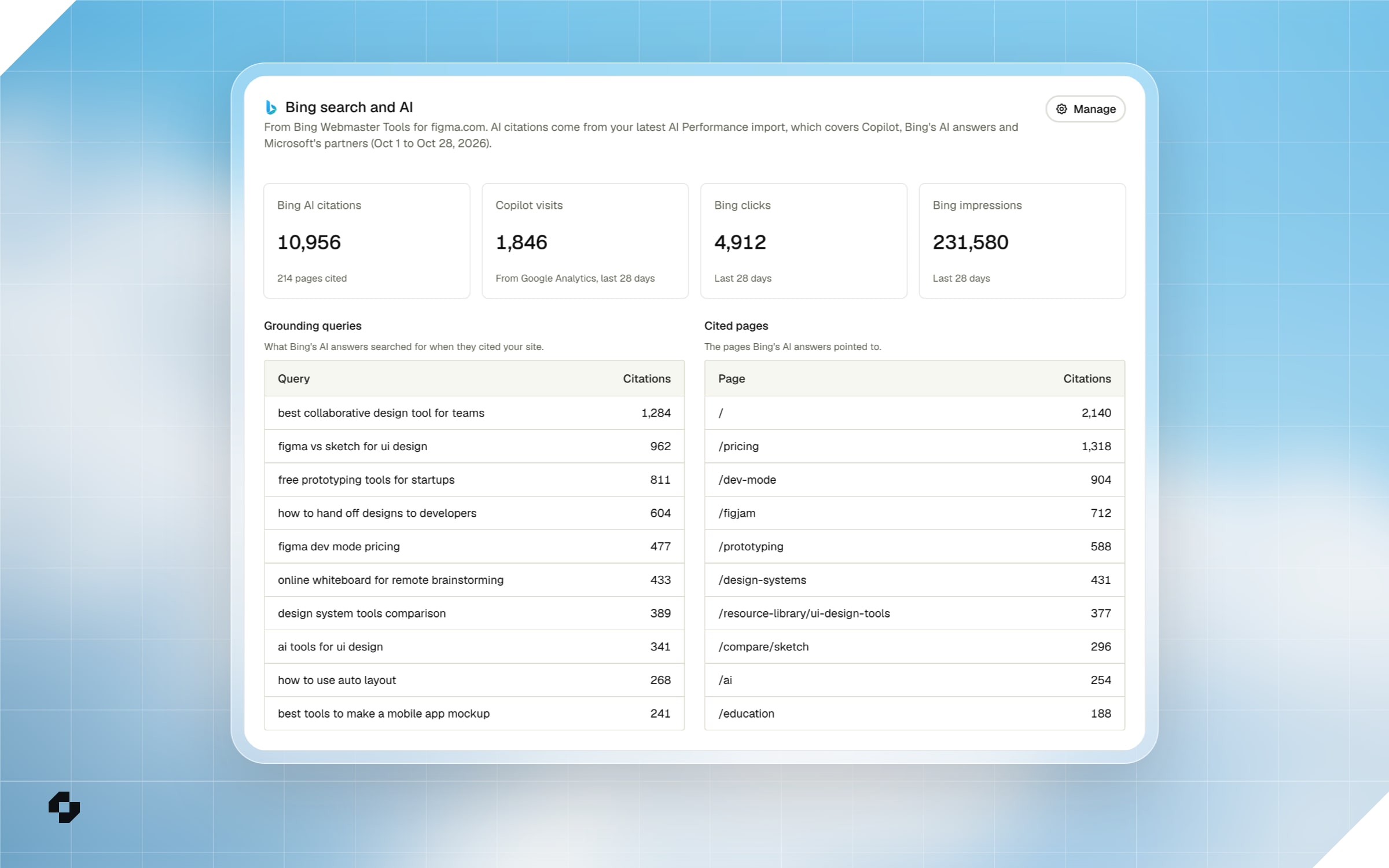
- Real queries, first-party. Most AI engines keep the searches behind their answers to themselves. Bing shares them. Its AI Performance report lists the grounding queries Copilot and Bing's AI answers searched before citing your site, and ChatFeatured now reads them.
- A Bing section in Website Analytics. See your Bing AI citations, the pages cited and the top grounding queries next to the visits Copilot sent you, with your Bing clicks, impressions and top Bing queries beside them. Copilot visits need Google Analytics, Plausible or Fathom connected.
- Prompts from real searches. When you generate prompts, ChatFeatured uses your Bing queries and grounding queries alongside your Search Console queries, so you track what people actually ask. Hover the search icon on a prompt to see the query it came from.
- Setting it up. In Integrations > Bing Webmaster Tools, paste a Bing API key for search data and upload the AI Performance CSV exports for citations. Either one works without the other. The setup guide walks through both.